
Haftalık gelir
Haftalık indirme
Puan
Fiyat
Haftalık gelir
Haftalık indirme
Puan
Fiyat
Gelir tahminlerini, reklamları, şikâyetleri ve anahtar kelimeleri görmek için abone ol.
Lansman fırsatı: 31 Ekim 2026 tarihine kadar %50 indirim
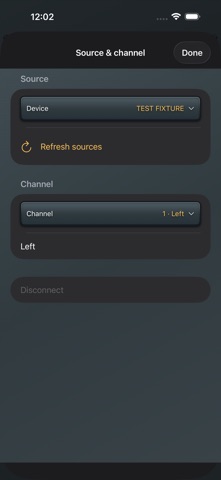
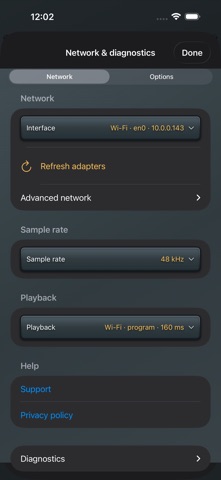
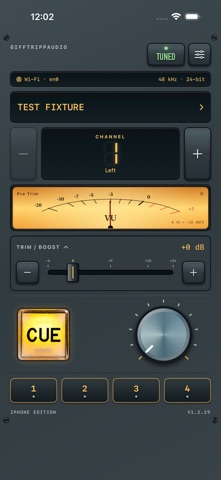
A quick listen into your audio network. GTA CUE brings local network audio metering and listening to your iPhone. Select a compatible Dante-network source, choose a channel, check its level, and tap CUE to listen. A MONITOR AT YOUR FINGERTIPS A rack-style interface puts source, channel, level, trim and listening controls together. Step between channels or pick one directly. Save four source/channel memories for fast recall. Choose segmented or analog-style metering, a pre-trim or post-trim meter view, and your preferred knob and perimeter-meter appearance. CONTROL WHAT YOU HEAR Adjust local monitor trim from -6 to +24 dB and set listening volume separately. CUE switches listening on and off. Optional Latch CUE resumes active listening after a successful channel change; it is off by default. These controls do not change the transmitter's audio. YOUR CONNECTION, YOUR CHOICE Choose the network adapter yourself. Match the source with manual 44.1, 48, 96 or 192 kHz selection. Receive supported 24-bit or 32-bit signed-integer PCM streams, one mono channel at a time. Inspect packet, buffer and playback diagnostics. An optional IPv4 range scan finds compatible sources that respond on a reachable network. WIRED AND WI-FI OPTIONS Use an Ethernet adapter for wired monitoring. Experimental Wi-Fi modes offer 60, 160 and 300 ms listening-buffer targets through an access point connected to the audio network. Wireless results depend on the source, access point and network; packet loss can cause missing audio. Buffer targets are not total end-to-end latency. LOCAL BY DESIGN Audio decoding, metering and playback run on your iPhone. No app account, ads, analytics SDK or developer-operated cloud audio service is required. A clearly labeled, silent Vegas demo lets you explore the controls without a transmitter. BEFORE YOU BUY A compatible transmitter and access to its local network are required for real metering and listening. GTA CUE does not supply audio sources. Compatibility and available formats depend on the transmitter and configuration. Selectable sample rates do not guarantee support from every source. Keep GTA CUE in the foreground while listening. It keeps the screen awake while tuned; manually locking the phone or backgrounding the app disconnects reception. Output-route changes mute listening. There is no AVB, multicast audio subscription, redundant network path or PTP-locked output. Monitor limiting and automatic gain reduction help manage sample levels but are not calibrated hearing protection. Set output volume appropriately for your headphones or speaker. By GIFFTRIPPAUDIO.


ABD App Store, 5 Eki 2026