Aylık gelir
Aylık indirme
Puan
Fiyat
Aylık gelir
Aylık indirme
Puan
Fiyat
Gelir tahminlerini, reklamları, şikâyetleri ve anahtar kelimeleri görmek için abone ol.
Lansman fırsatı: 31 Ekim 2026 tarihine kadar %50 indirim
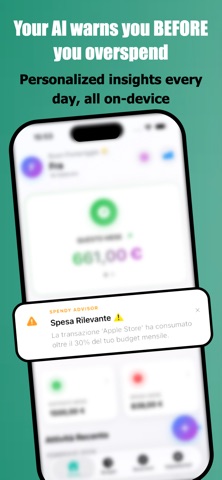
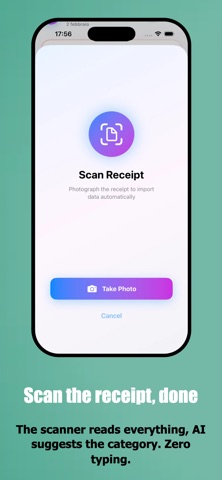
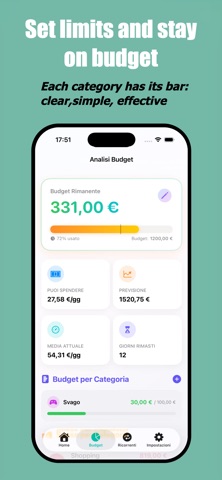
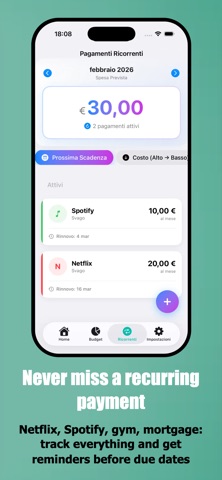
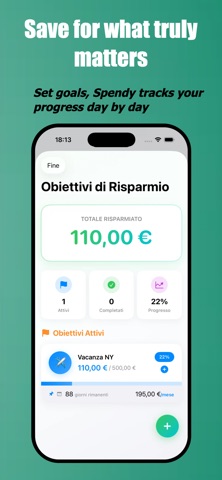
Track expenses at lightning speed! Use Quick Controls, scan receipts, and automate recordings with Apple Pay: your budget is always up-to-date, with zero hassle. Spendy is the budgeting app you won't abandon after a week. Record expenses manually, from Control Center, or with Quick Controls; scan receipts with OCR and let AI learn from your habits. Zero hassle, maximum control. WHY SPENDY - Custom categories (Pro) → Create categories with a name, icon, and color; Choose the order and use them for transactions, budgets, and recurring payments. - Quick Controls → Add an expense or open the scanner from Control Center, the Lock Screen, or the Action Button. - Apple Pay Automation → Set up Shortcuts to record payments without manually entering them. - Scan the receipt → Take a photo of the receipt: the app reads the amount and date in seconds. - Learning AI (Pro) → Suggests categories as you type and remembers your habits. - Quick Add from the icon → Press and hold the Spendy icon to add an expense from the Home screen. - Budget by category → Set monthly limits and check how much you can still spend. - Savings goals → Vacation, car, emergency: create a goal and Spendy tracks your progress. - Recurring payments → Reminders before each due date so you don't forget subscriptions and payments. - Smart widgets → Budgets, latest expenses, and statistics always visible on your screen. Home SPENDY ADVISOR: YOUR FINANCIAL AI Analyze spending patterns: "We're on day 10, and you've already used 60% of your budget." Identify hidden trends: "You're spending too much on weekends." Smart forecasts: "At this rate, you'll end the month with a €150+ premium." Proactive notifications: Unusual spending detected in real time. Everything locally on your iPhone. Privacy guaranteed. APPLE PAY AUTOMATION (Zero Effort) Set up Shortcuts to record Apple Pay or card payments (including contactless payments with supported cards and banks) in the background. Associate a merchant with a category, even a custom one: AI Pro will suggest it for subsequent transactions. Result: your budget is always up-to-date without you lifting a finger. QUICK FUNCTIONS Access from Control Center, Lock Screen, and Action Button; search and filters to find transactions; PDF/CSV export and iCloud backup with custom categories and sorting included. **GAMIFICATION & MOTIVATION** **FREE VERSION** - Unlimited expenses and income - 1 goal + 1 subscription + 1 widget - Essential statistics - Spendy Advisor (basic analysis) **SPENDY PRO** - Unlimited goals and subscriptions - Budgets for all categories - OCR receipt scanning - Apple Pay automation with Shortcuts - Full Spendy Advisor (predictions + advanced trends) - Shortcuts automation - Automatic iCloud backup - PDF/CSV export - All widgets - Advanced statistics with charts - Quick Controls (Lock Screen and Control Center) **PRIVACY FIRST** All data stays on your iPhone. No mandatory account, no external servers, no tracking. Face ID/Touch ID protection included. **LEGAL INFORMATION** Terms and Conditions (EULA): https://www.apple.com/legal/internet-services/itunes/dev/stdeula/ Privacy Policy: https://francescowebdesign.it/spendyapp/privacy.html **SUBSCRIPTION INFORMATION** Spendy Pro is available with the following options: AUTO-RENEWABLE SUBSCRIPTIONS: • Monthly: €2.99/month • Annual: €17.99/year (save 58%) ONE-TIME PURCHASE: • Lifetime: €44.99 (lifetime access, no renewals) Subscriptions automatically renew unless auto-renewal is turned off at least 24 hours before the end of the current period. Payment is charged to your Apple ID upon confirmation of purchase. You can manage your subscriptions and turn off auto-renewal in your Apple account settings after purchase. The Lifetime purchase is a one-time payment with no automatic renewal and grants access to all Premium features forever.
Şu anda ABD listelerinde yok.