
Plug Toolbox for Minecraft
Innovative Developers LTD
UtilitiesReleased Mar 2, 2018
Weekly revenue
Weekly downloads
Rating
Price
Innovative Developers LTD
Weekly revenue
Weekly downloads
Rating
Price
Subscribe to see revenue estimates, ads, complaints and keywords.
Launch offer: 50% off until October 31, 2026


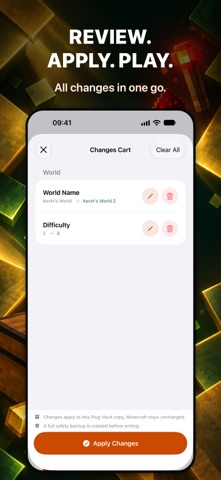
PLUG IN. BREAK THE RULES. Why mine for items when you can add them? Plug Toolbox lets you edit your Minecraft Bedrock worlds on iPhone and iPad. Choose a world, make your changes, review them together, then apply them. ITEMS AND ENCHANTMENTS • Add items and blocks from the supported catalogue to armour, offhand, hotbar, inventory and Ender Chest slots. • Add compatible enchantments individually or in bulk. Choose normal levels, Safe Max or Full Max. • Create usable item stacks with required item data filled in automatically. PLAYER AND WORLD • Change health, experience, abilities, movement, flight and position. • Edit game mode, difficulty, spawn, time, weather, multiplayer rules and other world settings. NBT EDITING Edit world, player and item NBT directly. Browse typed values, add suggested fields or create custom tags. Plug Toolbox preserves unknown data that you do not edit, which helps when Minecraft adds new fields. REVIEW AND BACKUPS Stage changes to several parts of a world in one session. Review the previous and proposed values before you apply them. Plug Toolbox creates an automatic backup before supported writes and verifies the result afterward. You can also duplicate a world or keep a separate copy in Plug Vault. If the world is from a newer Minecraft version, the app shows a compatibility warning and leaves editing available. Make a copy first if the world matters to you. To work on a Minecraft world, connect its worlds folder once. Close Minecraft before applying changes, then open it again. Minecraft is required and sold separately. NOT AN OFFICIAL MINECRAFT PRODUCT. NOT APPROVED BY OR ASSOCIATED WITH MOJANG OR MICROSOFT.
Not on the US charts right now.